




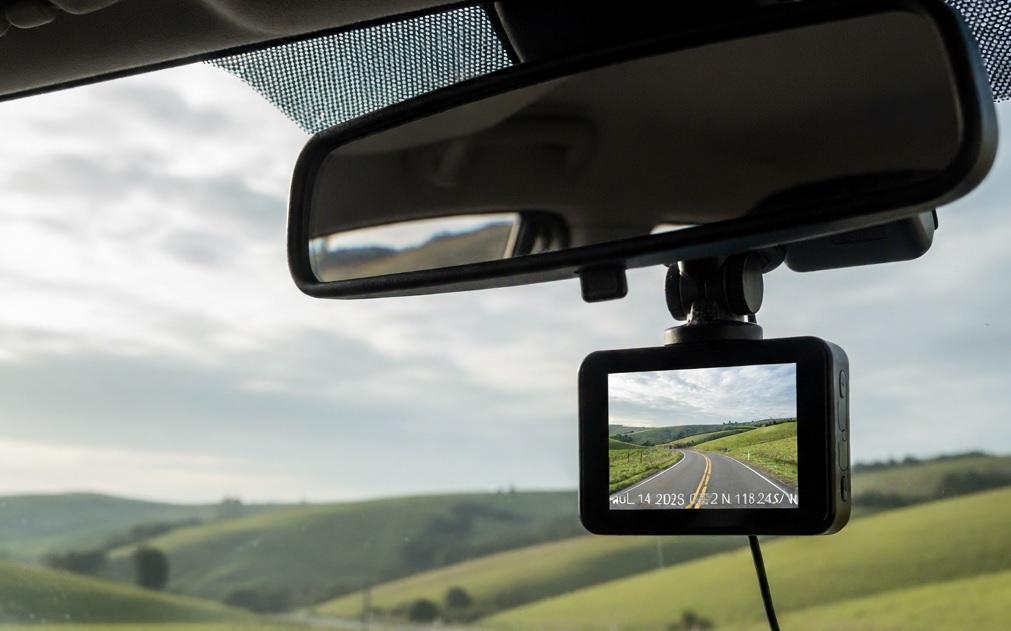
Buying a dash cam used to be something only professional drivers or tech enthusiasts did. Today, it's a smart move for almost anyone who spends time behind the wheel. On your daily commute, running errands, or hitting the road for a trip, a dash cam can protect you from false claims, catch hit-and-run drivers, and even record surprising moments along the way.
But with so many models on the market-some cheap, some expensive, some packed with confusing features-it's easy to feel overwhelmed. This guide cuts through the noise and gives you helpful advice to choose the right dash cam.
Why You Should Consider a Dash Cam
Accidents happen fast. Memories fade. Witnesses disappear. A dash cam gives you an unbiased record of what really happened. That video can be the difference between paying a huge insurance deductible or walking away with your record clean.
Some drivers use dash cams to monitor their teen's driving habits. Others rely on them in high-theft areas or places with frequent insurance fraud. Even if you've never been in a crash, having footage can speed up claims and prevent headaches.
Key Features to Look For
Not all dash cams are created equal. Here's what actually matters when you're shopping:
Video Quality
Resolution is the first thing most people check-and for good reason. A blurry video won't help anyone. Look for at least 1080p Full HD. Many newer models offer 2K or even 4K, but remember: higher resolution means bigger file sizes and more storage needed.
Don't just check the resolution number. Pay attention to real-world performance, especially in low light. A dash cam with good night vision uses a wide aperture (like f/1.8 or lower) and a high-quality sensor. Read reviews that mention how clear license plates are after dark.
Field of View (FOV)
The field of view tells you how much of the road the camera sees. Too narrow, and you'll miss cars in adjacent lanes. Too wide, and everything looks stretched or distorted at the edges.
Aim for a horizontal field of view between 120 and 140 degrees. That's enough to capture your lane, the lane next to you, and part of the sidewalk-without making objects look unnatural.
Loop Recording
You don't want to keep swapping memory cards every few hours. Loop recording solves that. The camera records in short clips (usually 1, 3, or 5 minutes) and automatically overwrites the oldest files when the memory card fills up.
This feature is standard on almost all modern dash cams, but double-check before you buy. Without it, you'll run out of space quickly.
G-Sensor (Impact Detection)
A G-sensor detects sudden movements like hard braking, sharp turns, or collisions. When it senses a jolt, it locks that video file so it won't get overwritten.
This is essential. Without it, your crash footage might disappear the next time the camera loops. Most decent dash cams include this, but it's worth confirming.
Parking Mode
Parking mode lets your dash cam keep watching your car even when the engine is off. It usually activates after a period of inactivity and records only when it detects motion or impact.
Be careful here. Parking mode drains your car battery if it's not set up correctly. Some models need to be hardwired into your fuse box for safe, long-term use. Others use motion detection with a regular power cable-but those may only last a few hours.
GPS
GPS adds location and speed data to your videos. That can be useful if you need to prove exactly where and how fast you were driving during an incident.
It's not essential for everyone, but it's helpful if you drive in areas with speed traps or if you want detailed logs for fleet management. Note: GPS doesn't track your car in real time-it just logs data during recording.
Wi-Fi and App Support
Many dash cams now connect to your smartphone via Wi-Fi. You can view, download, or share clips without pulling out the memory card.
This is convenient, but not critical. If you rarely check footage unless something happens, you might not need it. If you like quick access or want to show a clip to your insurance agent on the spot, it's worth having.
Single vs. Dual Camera Systems
Most dash cams only record the front view. That's fine for basic protection. But if you want full coverage, consider a dual-channel system.
- Front-only: Cheaper, easier to install, uses less storage.
- Front and rear: Records what's happening behind you-useful for rear-end collisions, tailgating, or vandalism while parked.
Some dual kits even include an interior-facing camera to monitor driver behavior or passengers. These are common in ride-share vehicles or delivery fleets.
Keep in mind: dual systems cost more, need more wiring, and fill up memory cards faster. Only go for it if you truly need rear coverage.
Storage and Memory Cards
Dash cams don't have built-in storage. They rely on microSD cards, usually 32GB to 256GB. Check what your model supports-some older ones max out at 64GB.
Use a high-endurance or dash cam-specific memory card. Regular cards wear out quickly from constant writing and rewriting. Brands like SanDisk, Samsung, and Lexar make cards rated for surveillance use.
Also, format your card in the dash cam every few weeks. This keeps performance smooth and prevents errors.
Installation Tips
Most dash cams mount to your windshield with a suction cup or adhesive pad. Place it behind the rearview mirror if possible-this keeps it out of your line of sight and reduces glare.
Run the power cable along the headliner and down the A-pillar to keep it tidy. If you're using parking mode, consider professional hardwiring to avoid battery drain. Many auto shops or electronics stores offer this service for under $50.
Never let the camera block your view. In some places, that's against the law.
What to Avoid
Not every dash cam is worth your money. Watch out for these red flags:
- Extremely cheap models under $30: They often have poor night vision, unreliable loop recording, or overheat in summer.
- Vague specs: If the listing doesn't clearly state resolution, FOV, or sensor type, be suspicious.
- No G-sensor: Skip any model that lacks impact detection.
- "Lifetime warranty" claims: These are often marketing tricks. Stick with brands that have real customer support.
Top Brands Worth Considering
You don't need to guess which brands deliver. These have consistently good reviews and reliable performance:
- Garmin: Simple, durable, excellent video quality.
- Nextbase: Strong in parking mode and emergency recording.
- Vantrue: Great for night vision and dual-channel setups.
- Thinkware: Premium build, ideal for hardwired parking mode.
- BlackVue: High-end, cloud-connected options (but pricey).
Budget brands like Rexing or YI also offer solid value if you're watching your wallet.
How Much Should You Spend?
You can find decent dash cams starting around $50. For most drivers, $70 to $150 gets you everything you need: 1080p or better, good night vision, G-sensor, loop recording, and maybe Wi-Fi.
Go above $200 only if you need advanced features like 4K, cloud backup, or professional-grade parking surveillance. For everyday use, mid-range models offer the best balance of price and performance.
Maintenance and Best Practices
Once you've installed your dash cam, don't forget to maintain it:
- Clean the lens weekly with a microfiber cloth.
- Check recordings occasionally to confirm everything works.
- Replace the memory card every 6-12 months, even if it seems fine.
- Update firmware if the manufacturer releases new versions.
A dash cam only helps if it's working when you need it. A little upkeep goes a long way.
Conclusion
A dash cam isn't just another gadget. It's peace of mind on your windshield. You hope you'll never need the footage-but if you do, you'll be glad you had it.
Focus on video quality, reliable recording, and impact detection. Ignore flashy extras you won't use. Choose a model that fits your driving habits and budget. And once it's installed, drive with a little more confidence.
Frequently Asked Questions (FAQ)
Do dash cams work when the car is off?
Only if they have parking mode and are connected to a power source that stays on when the engine is off-like a hardwired setup. Plug-in models usually shut down with the car.
Can dash cam footage be used in court?
Yes, in most places. As long as the video is unedited and clearly shows the event, it's considered valid evidence. Always keep the original file.
Will a dash cam drain my car battery?
Not if it's plugged into a switched power source (like your cigarette lighter). But if you use parking mode without proper hardwiring, it can drain your battery over time.
Do I need two cameras?
Not unless you want to record the rear of your vehicle. A single front camera covers most accident scenarios. Add a rear camera only if you frequently park in risky areas or drive a large vehicle.
How long does footage stay on the memory card?
It depends on the card size and video quality. A 64GB card recording in 1080p at 30fps usually holds about 4-6 hours before looping starts. Higher resolutions fill up faster.
Is it legal to use a dash cam?
Yes, in most countries including the U.S., Canada, and the U.K. However, some places restrict where you can mount it on the windshield. Always check local laws.


